Yes, Android only. Telescope.Touch is based on Google Sky Map, IPARCOS and INDIForJava. There is no way to port it to iOS or other operating systems.
I’m the developer of IPARCOS and I’m maintaining INDIForJava (see GitHub), so I decided to merge all the projects into one big app.
I hope y’all will enjoy it!
I would like to try it out, but do not see an APK in the repo or a link to the file/release. Do you have a URL? I am not set up to build APKs right now.
I’m trying to add BLOB support to the app (for the moment, only a simple photo viewing functionality), and I’m running into troubles. Can you help me?
I start an INDI server (latest stable version) on my Astroberry, standalone without KStars. The only drivers in the server are the CCD simulator and a QHY 5L-II CCD. All the tests I’ve made return the same results regardless of which CCD I’m working on.
Here’s what I’ve done:
Connect every driver and ensure everything is working. I’m able to get pictures from a remote KStars connected to the server.
Use Telescope.Touch in debug mode to get the XML messages from of the drivers - works, I can see prop updates in XML format
Fire a 1second test capture from Telescope.Touch. The capture starts regularly.
Read every XML message that arrives
Results: number, text and switch prop updates are always perfectly received and I get the right values, as usual. However, I never get the “CCD1” property updates, which should contain the captured FITS file. I do see the CCD1 BLOB property being created, but it never receives updates when the capture ends. The only data I can get after the capture is the photo’s location in the Astroberry (“/home/astroberry/Captures”) when the capture mode is set to “Local” or “Both”.
Do you think I’m doing something wrong?
I’ve solved the problem, I didn’t know I had to enable BLOB receiving in the client. The problem now is the phone’s memory, I can’t load any image larger than 1000x1000px without out-of-memory errors :lol: (FITS format = no compression)
I guess I won’t add full image support to avoid crashing people’s phones…
I’ve just tried out the latest version from Google Play. The basic INDI telescope control and Skymap work pretty well, but the Goto/Sync function doesn’t seem to work at all. Whenever I tapped on it, I would be back at the home screen of my phone. The app would still be running in the background and the telescope would be pointing at some random place.
I’ve been looking for a simple Android INDI client with Goto function to go along with my DIY eFinder based on Astroberry. The eFinder is for visual use and has a GPIO button that will initiate plate solve and centre the target in the eyepiece when being pressed. The potential candidates so far are Kstars Lite (no longer supported and very slow), SkySafari 6 Plus (cost money. I’d rather pay for StellarmateOS and its mobile app) and this. If the Goto can be fixed, it will be great.
Hi Ming Jiang,
Thank you for your review on the Play Store. To solve the issue, I need more details about your telescope mount and Android device.
Android version and possibly the phone model
The telescope mount you’re using
INDI driver of the mount
The object you selected in the GoTo and where the telescope ended up instead. Maybe the issue is just a wrong object in the database.
Does eFinder interfere with Telescope.Touch? If so, I need more details about eFinder itself
It would be really helpful if you could also do some tests:
Test Telescope.Touch with an INDI telescope simulator
Test it with your telescope mount alone (no CCD, eFinder, focuser, etc)
The fact that the app doesn’t crash, but takes you to the home screen, is suspicious. I’ll try to provide you with a beta version as soon as I figure out the issue.
I’ve tested the app only with my AstroEQ mount, and it works. Unfortunately I don’t have access to other telescopes for testing.
Kind regards,
Marco Cipriani
My phone was running Android 9 (Pie) whereas my tablet which I also tested the app was on Android 8 (Oreo)
The telescope mount that I tested the app on was ES iEXOS-100 PMC8 and the built in INDI telescope simulator
indi_pmc8 for the ES mount
The objects I tried were Vega, Deneb and M31
The eFinder was running the INDI server through Ekos. I then connected Telescope.touch to the server. According to the INDI control panel the connection was successful and I could slew the mount manually with the telescope controls in the app.
I’ve already tested it with the telescope simulator on its own (no ccd simulator or focuser simulator).
Hope the above information helps. And don’t worry if it’s going to take some time to fix this. I can fully understand that it’s not possible for you to test the app on a wide variety of mounts on your own. You’re already doing a big favour for the community.
I managed to reproduce the issue using a Chromebook. It’s basically a “weird Android computer”, so it behaves differently from my smartphone and phone emulators. The app crashes like you described after a GoTo and whenever I flip the screen. I’ll tell you when the fix is available on Google Play.
This is great. I installed the Google Play store release on my LG G6 running Android 8.0.0, Kernel V.3.18.71.
I also experienced the app close, but not crash, to the home screen when choosing a star from the goto list.
I think the goto list filters should be expanded to filter out objects that are not visible. The list should also show other information like rise/set time, altitude.
I look forward to seeing where this project goes in the future. Thank you.
All the issues are now fixed. I confirm the fact that the app was pointing the telescope in the wrong place. The update will be rolling out on Google Play soon.
That would be a nice feature, I’ll add it to my TO-DO. It is, however, a bit complicated to implement: I need to figure out the formulas and optimise them, because calculating rise/set times for 14000 objects on a smartphone means torturing Android.
If there’s an Android developer here, I encourage him to join the project, because Telescope.Touch is growing faster than I had planned. Donations would be great, too!
Hi Marco,
i’ve an indi server running on a raspi controlling a lx200gps. It all warks ok from a kstars on linux but i can’t connect to server with your app. When i try (with the right ip) it tells me “Problem connnecting to…” and “connection lost”.
Thanks
Hi,
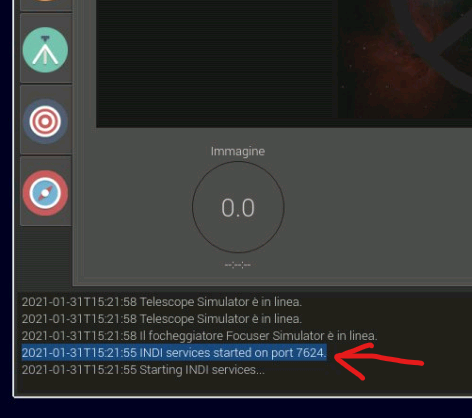
Maybe you’re connecting to the wrong port. The default one is 7624, but sometimes INDI happens to use other ports, like 7625, 7626 and so on. See the screenshot below.
If that’s not your case, please let me know more details about your configuration, like the Android version and where the server is (e.g. an Astroberry).
You should also try other INDI clients and see if you can connect remotely.
Kind regards,
Marco Cipriani
Thank you for the updated version of the app, Marco.
Goto in the latest version now works correctly on my tablet running Android 7 (I got it wrong in my last reply. It’s 7 not 8 ).
However on my phone (OnePlus 3T running Android 9) it still quitted to home screen as soon as I tapped “Goto” or “Sync”. The scope would also point to some random place.
Tested with both iEXOS-100 and telescope simulator.

 I just got sidetracked and didn’t get back to posting. Downloading the new one now.