I can't find a simple and suitable ROR driver

Hi
I have read almost all the threads about domes or ROR, and I have tried different solutions, but none of them work, and I can’t find something as simple as what I need.

Let me explain:
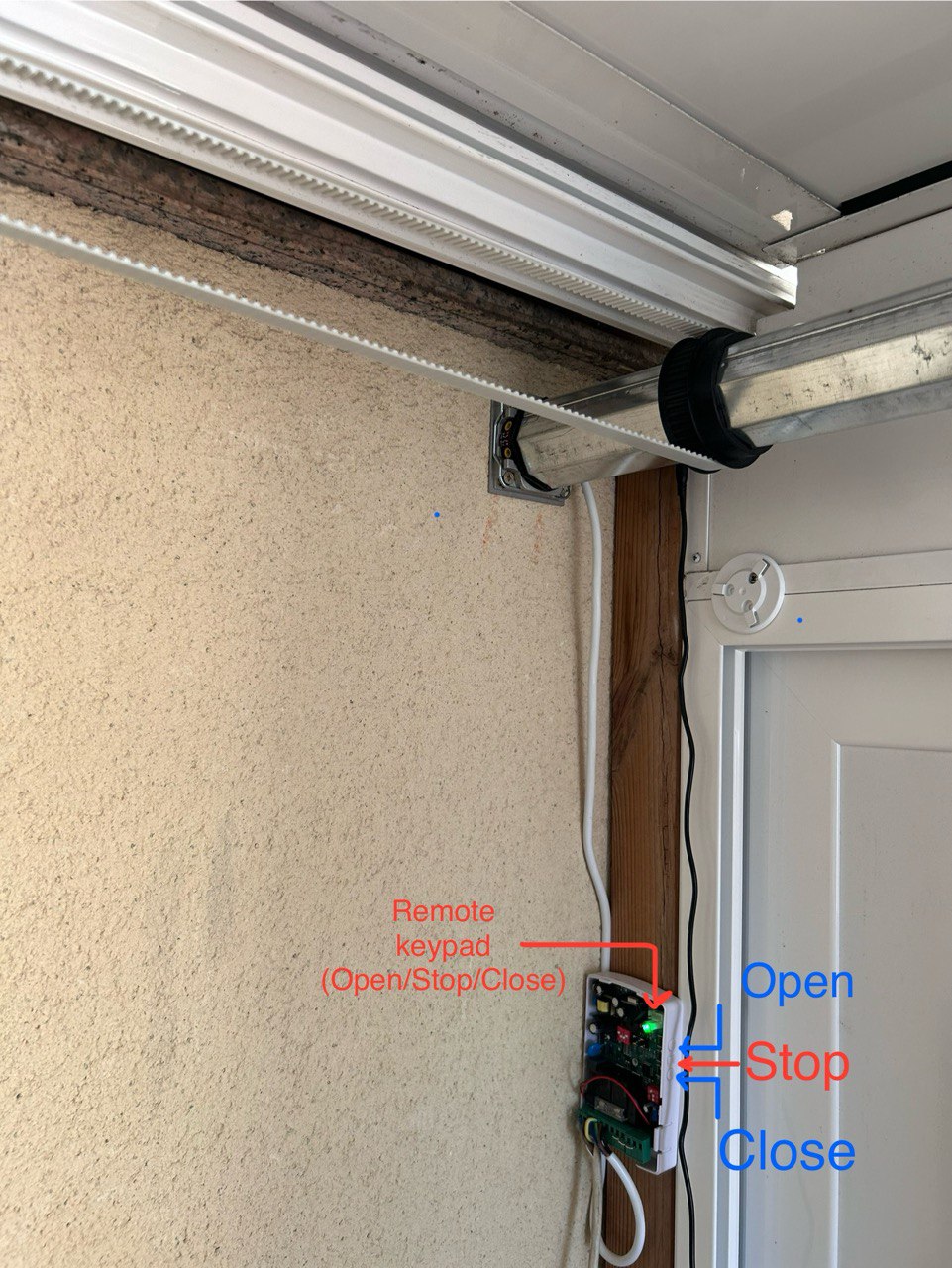
I built my observatory with a two-slat (manual) sliding roof. This year, I have motorized it with a blind motor that has its own limit switches, pulleys and belts. Then I added an inexpensive garage door control board that also has limit switches, an IR stop, a remote controller, a timer, etc.
This board allows you to use a remote keyboard to OPEN, STOP and CLOSE with a 4-pin connector. This means I only need a three-relay card with its INDI driver instead of the keyboard… but then here come all my trouble:

1-I have the Lunatico Seletek Platypus (focus+peripheral) Controller and Firefly Relay Box, but the Firefly is out of date, and it only runs with ASCOM. Lunatico is not updating it or releasing an INDI driver.
2-The Platypus has an interesting feature that allows you to power and switch components through its 9-pin DB9 connectors, but although it has an INDI driver, this function has not been implemented.
> I opened a thread asking about this question here , but had no answers.

3-So I assume I have to use a different relay board.
I run INDI in a remote Raspberry Pi4B inside an Astrojolo’s Astrolink4 Pi v.1, so to complicate things further, the Raspberry GPIO is not available.
Then I read about the “indi_usbrelay2_roof” driver and thought all my troubles were solved. I bought an USB-4 relay board, but I’m not able to make it run in any way.
I have to say, I have no skills at all about programming software, writing drivers and scripts, or Linux.
This is the point where I’m stuck, so any help or suggestions would be greatly appreciated!

[quote]
root@xavier-HP:/home/xavier/Projects/indi_usbrelay2_roof/build# cmake -DCMAKE_INSTALL_PREFIX=/usr . ..
CMake Deprecation Warning at CMakeLists.txt:1 (cmake_minimum_required):
Compatibility with CMake < 2.8.12 will be removed from a future version of
CMake.

Update the VERSION argument value or use a … suffix to tell
CMake that the project does not need compatibility with older versions.

– The CXX compiler identification is GNU 11.4.0
– Detecting CXX compiler ABI info
– Detecting CXX compiler ABI info - done
– Check for working CXX compiler: /usr/bin/c++ - skipped
– Detecting CXX compile features
– Detecting CXX compile features - done
– Found INDI-DRIVERS: /usr/lib/x86_64-linux-gnu/libindidriver.so
– Found LIBNOVA: /usr/lib/x86_64-linux-gnu/libnova.so
– Found USB_RELAY_DEVICE: /usr/local/lib/libusb_relay_device.so
– Configuring done
– Generating done
– Build files have been written to: /home/xavier/Projects/indi_usbrelay2_roof/build
root@xavier-HP:/home/xavier/Projects/indi_usbrelay2_roof/build# make install
[ 33%] Building CXX object CMakeFiles/indi_usbrelay2_roof.dir/usbrelay2_roof/usbrelay2_roof.cpp.o
/home/xavier/Projects/indi_usbrelay2_roof/usbrelay2_roof/usbrelay2_roof.cpp: In member function ‘virtual bool USBRelay2::saveConfigItems(FILE*)’:
/home/xavier/Projects/indi_usbrelay2_roof/usbrelay2_roof/usbrelay2_roof.cpp:120:27: error: ‘INDI::PropertyView* INDI::PropertyBasic::operator&;() [with T = _IText]’ is protected within this context
120 | IUSaveConfigText(fp, &ActiveDeviceTP);
| ^~~~~~~~~~~~~~
In file included from /usr/include/libindi/indipropertytext.h:21,
from /usr/include/libindi/basedevice.h:29,
from /usr/include/libindi/parentdevice.h:3,
from /usr/include/libindi/defaultdevice.h:21,
from /usr/include/libindi/indidome.h:25,
from /home/xavier/Projects/indi_usbrelay2_roof/usbrelay2_roof/usbrelay2_roof.h:25,
from /home/xavier/Projects/indi_usbrelay2_roof/usbrelay2_roof/usbrelay2_roof.cpp:22:
/usr/include/libindi/indipropertybasic.h:115:27: note: declared protected here
115 | PropertyView * operator &;();
| ^~~~~~~~
/home/xavier/Projects/indi_usbrelay2_roof/usbrelay2_roof/usbrelay2_roof.cpp: In member function ‘virtual void USBRelay2::TimerHit()’:
/home/xavier/Projects/indi_usbrelay2_roof/usbrelay2_roof/usbrelay2_roof.cpp:613:9: error: ‘DomeMotionS’ was not declared in this scope; did you mean ‘DomeMotionSP’?
613 | if (DomeMotionS[DOME_CW].s == ISS_ON)
| ^~~~~~~~~~~
| DomeMotionSP
/home/xavier/Projects/indi_usbrelay2_roof/usbrelay2_roof/usbrelay2_roof.cpp: In member function ‘virtual IPState USBRelay2::Move(INDI::Dome::DomeDirection, INDI::Dome::DomeMotionCommand)’:
/home/xavier/Projects/indi_usbrelay2_roof/usbrelay2_roof/usbrelay2_roof.cpp:669:20: error: ‘DomeMotionS’ was not declared in this scope; did you mean ‘DomeMotionSP’?
669 | else if ( (DomeMotionS[DOME_CW].s == ISS_ON && dir == DOME_CCW)
| ^~~~~~~~~~~
| DomeMotionSP
/home/xavier/Projects/indi_usbrelay2_roof/usbrelay2_roof/usbrelay2_roof.cpp:694:9: error: ‘DomeMotionS’ was not declared in this scope; did you mean ‘DomeMotionSP’?
694 | DomeMotionS[dir].s = ISS_ON;
| ^~~~~~~~~~~
| DomeMotionSP
/home/xavier/Projects/indi_usbrelay2_roof/usbrelay2_roof/usbrelay2_roof.cpp:695:22: error: ‘class INDI::PropertySwitch’ has no member named ‘s’
695 | DomeMotionSP.s = IPS_BUSY;
| ^
/home/xavier/Projects/indi_usbrelay2_roof/usbrelay2_roof/usbrelay2_roof.cpp: In member function ‘virtual bool USBRelay2::Abort()’:
/home/xavier/Projects/indi_usbrelay2_roof/usbrelay2_roof/usbrelay2_roof.cpp:783:9: error: ‘DomeMotionS’ was not declared in this scope; did you mean ‘DomeMotionSP’?
783 | if (DomeMotionS[DOME_CW].s == ISS_ON && DomeMotionS[DOME_CCW].s == ISS_OFF)
| ^~~~~~~~~~~
| DomeMotionSP
/home/xavier/Projects/indi_usbrelay2_roof/usbrelay2_roof/usbrelay2_roof.cpp: In member function ‘void USBRelay2::setAbsolutePosition()’:
/home/xavier/Projects/indi_usbrelay2_roof/usbrelay2_roof/usbrelay2_roof.cpp:897:14: error: ‘DomeMotionS’ was not declared in this scope; did you mean ‘DomeMotionSP’?
897 | else if (DomeMotionS[DOME_CCW].s == ISS_ON)
| ^~~~~~~~~~~
| DomeMotionSP
/home/xavier/Projects/indi_usbrelay2_roof/usbrelay2_roof/usbrelay2_roof.cpp: In member function ‘bool USBRelay2::StopParkingAction(int)’:
/home/xavier/Projects/indi_usbrelay2_roof/usbrelay2_roof/usbrelay2_roof.cpp:926:5: error: ‘DomeMotionS’ was not declared in this scope; did you mean ‘DomeMotionSP’?
926 | DomeMotionS[dir].s = ISS_OFF;
| ^~~~~~~~~~~
| DomeMotionSP
/home/xavier/Projects/indi_usbrelay2_roof/usbrelay2_roof/usbrelay2_roof.cpp:945:22: error: ‘class INDI::PropertySwitch’ has no member named ‘s’
945 | DomeMotionSP.s = IPS_OK;
| ^
/home/xavier/Projects/indi_usbrelay2_roof/usbrelay2_roof/usbrelay2_roof.cpp:954:22: error: ‘class INDI::PropertySwitch’ has no member named ‘s’
954 | DomeMotionSP.s = IPS_ALERT;
| ^
make[2]: *** [CMakeFiles/indi_usbrelay2_roof.dir/build.make:76: CMakeFiles/indi_usbrelay2_roof.dir/usbrelay2_roof/usbrelay2_roof.cpp.o] Error 1
make[1]: *** [CMakeFiles/Makefile2:83: CMakeFiles/indi_usbrelay2_roof.dir/all] Error 2
make: *** [Makefile:136: all] Error 2 [/quote]
In summary, is it correct to say
You have the garage door opener controller connected to and driving your motor.
You are running Stellarmate on a AstroLink Astroberry Raspberry Pi.
You can’t get access to its GPIO pins (because they are enclosed by the box?)
You need a driver that can work 3 relays to activate the open/close/stop connections on the garage opener controller.
If those build issues with your relay solution was fixed, would that solve the problem?

background questions:
What kind of motor is it DC? What voltage is the garage door opener feeding to it?
When using the controller to operate it, do limit switches tell it when to stop?
Can the AstroLink box be discarded?

I’m glad to know that you understood everything!

So - GPIO is closed (and used) by the Astrolink4Pi
I think the indi_usbrelay2_roof driver could solve the problem, but I haven’t been able to test it.
It should have the option to simulate a pulse. I suppose that programming a short relay action will be enough.

background questions:
-What kind of motor is it DC? What voltage is the garage door opener feeding to it?

Both are AC 230V
Edit: The external keypad has 4 wires: Op-Cl-St-Comm (that’s why I thought it should be so easy)

When using the controller to operate it, do limit switches tell it when to stop?
Yes: I would like to use this switches to confirm the mount is parked, and as limit switches. Then use the motor’s own switches as a last resort.

Can the AstroLink box be discarded?
I would prefer not to rule it out since it gives me several gadgets (focuser, dew heaters and so)

Thanks!

I think that if I have to discard the astrolink it would not be a serious problem either. I could assume it.
I have alternatives and I prefer to solve the roof automation

So lets look into what is going on with indi_usbrelay2_roof driver.
With the AstroLink systems are you able and do you do StellarMate updates?
Need to know what version of INDI you are running.
Because you are building it, I assume indi_usbrelay2_roof driver is not available already built under the Ekos profile editor? Where are you getting the sources from.

With the AstroLink systems are you able and do you do StellarMate updates?
Yes

Need to know what version of INDI you are running.
How can I know? Kstars is 3.7.1 and I’m sure everything is up to date

Because you are building it, I assume indi_usbrelay2_roof driver is not available already built under the Ekos profile editor? Where are you getting the sources from.
It is not available. I 've followed this: https://github.com/magnue/indi_usbrelay2_roof
And tried to isntall in the remote PC runing Ubuntu 22.04.4LTS

I have read that Jasem is working on a universal roof driver and maybe that is the best solution?

I think the standard rolloff probably will be the best approach. The question about what release is just so I could match up here with what you are running. KStars 3.7.1 is associated with indi 2.0.8 you can see this by running indiserver without any paramters.
The errors just look like it is missing a few edits that were made for release 2.0.8. They would be simple to fix for the author if you have a way to contact them. If you got the sources from a github location you can submit a bug report there.

1 Like

Understood, I’m going to report the bug on Github.Thanks for the guidance.

Regarding discarding the Astrolink, did you have any suggestions?

I was trying to ask itof you you could remove the case to expose the gpio pins, if that would provide other options for setting relays.
Don’t know any reason to swap them out since it seems they are running your StellarMate just fine.
What are the options now?

  • Get an idea of how long it will be to get a first cut of the proposed standard rolloff controller
  • See if there is a response from your github posting. With fixes
  • Try and edit the source to fix the errors.
  • There are lots of USB relay controllers at Amazon, there is the script based indi rolloff driver that I assume could be used.
  • rolloffino I work with but that entails introducing an Arduino into the mix and the added expense if a relay shield is used.
  • Other?

If you look at the errors in your first post, most of the errors have a pattern.
If you were to edit your .cpp file on the lines that are indicated in the error messages.

replace .s with .getState()

That should take care of most of the errors. See what is left

1 Like

[quote=“wotalota”]If you look at the errors in your first post, most of the errors have a pattern.
If you were to edit your .cpp file on the lines that are indicated in the error messages.

replace .s with .getState()

That should take care of most of the errors. See what is left

[/quote]
I have edited the .cpp as you said, in different ways:
I have replaced the “.s” with “.getState()” in those lines that gave an error. It hasn’t worked. It gave similar errors.

[code]/home/xavier/Projects/indi_usbrelay2_roof/usbrelay2_roof/usbrelay2_roof.cpp:695:30: error: lvalue required as left operand of assignment
695 | DomeMotionSP.getState() = IPS_BUSY;
| ~~~~~~~~~~~~~~~~~~~~~^~

[/code]
I replaced all the “DomeMotionS” with “DomemotionSP” but had the same results.
I asked a friend of mine (ChatGPT), who gave me several instructions in the same way, but I I have not been able to follow them.

I don’t want to waste your time since I have reached a point that is far beyond my knowledge. I appreciate your effort to help me!
I will wait for the development of that universal driver.

OTOH, since you mentioned the use of GPIO I have found some very interesting hat relay modules for Raspberry Pi, but I don’t know if there is any type of driver for them. Do you?
You also mentioned the script based indi rolloff driver wich I haven’t read about. I have found the rolloffino, which as you said uses Arduino and is something that, although it seems relatively easy, I am also unaware of. Furthermore, I think it would be a way to complicate my installation unnecessarily…

Thank you Tom!
Xavier

Sorry for my sloppy directions.

I did an edit pass on the file and will attach the edited file. Save the original under a different name and replace it with the attached. The attached has a .txt extension, rename it back to usbrelay2_roof.cpp. You can install and run a program like “meld” to compare the differences. I can’t say for sure it will work one change in particular was a guess at what might be needed.

If you are building on your StellarMate computer after the build you can find the resulting driver in the Ekos profile editor under the Dome options.
If not you will need to copy the executable, the rules and the .xml file from the build machine to the StellarMate machine like the build did as shown below.

[ Edit ] Of course the same thing applies about the first build of the USB library files need to get those results over to the StellarMate machine also.

base) tg@tbreak:build$ sudo make install
[sudo] password for tg:
Consolidate compiler generated dependencies of target indi_usbrelay2_roof
[ 33%] Building CXX object CMakeFiles/indi_usbrelay2_roof.dir/usbrelay2_roof/usbrelay2_roof.cpp.o
[ 66%] Building CXX object CMakeFiles/indi_usbrelay2_roof.dir/usbrelay2_roof/usb_interface.cpp.o
[100%] Linking CXX executable indi_usbrelay2_roof
[100%] Built target indi_usbrelay2_roof
Install the project…
– Install configuration: “”
– Installing: /usr/bin/indi_usbrelay2_roof
– Set runtime path of “/usr/bin/indi_usbrelay2_roof” to “”
– Installing: /lib/udev/rules.d/99-usbrelay2.rules
– Installing: /usr/share/indi/indi_usbrelay2_roof.xml
(base) tg@tbreak:build$

usbrelay2_roof.txt (37.5 KB)

1 Like

I won’t be home during the weekend, but I’ll try it as soon as I come back. I’ll also compare to see what you’ve changed, maybe I’ll learn something!
Thank you!

[quote=“wotalota”]Sorry for my sloppy directions.

I did an edit pass on the file and will attach the edited file. Save the original under a different name and replace it with the attached. The attached has a .txt extension, rename it back to usbrelay2_roof.cpp. You can install and run a program like “meld” to compare the differences. I can’t say for sure it will work one change in particular was a guess at what might be needed.

If you are building on your StellarMate computer after the build you can find the resulting driver in the Ekos profile editor under the Dome options.
If not you will need to copy the executable, the rules and the .xml file from the build machine to the StellarMate machine like the build did as shown below.

[ Edit ] Of course the same thing applies about the first build of the USB library files need to get those results over to the StellarMate machine also.

base) tg@tbreak:build$ sudo make install
[sudo] password for tg:
Consolidate compiler generated dependencies of target indi_usbrelay2_roof
[ 33%] Building CXX object CMakeFiles/indi_usbrelay2_roof.dir/usbrelay2_roof/usbrelay2_roof.cpp.o
[ 66%] Building CXX object CMakeFiles/indi_usbrelay2_roof.dir/usbrelay2_roof/usb_interface.cpp.o
[100%] Linking CXX executable indi_usbrelay2_roof
[100%] Built target indi_usbrelay2_roof
Install the project…
– Install configuration: “”
– Installing: /usr/bin/indi_usbrelay2_roof
– Set runtime path of “/usr/bin/indi_usbrelay2_roof” to “”
– Installing: /lib/udev/rules.d/99-usbrelay2.rules
– Installing: /usr/share/indi/indi_usbrelay2_roof.xml
(base) tg@tbreak:build$
[/quote]
Well, I have been able to see the changes and it is evident that I would not have achieved it. Thanks x1
The command “sudo make install” gave me exactly the same result you posted, so Thanks x2
I found the driver in the profile editor so Thanks x3

Now I have to configure it and check that my relays work, but for now I must thank you for opening this door through which I can continue moving forward.
Very big and sincere THANKS!

Ok, it’s tested and works flawlessly… BUT
The driver’s behavior is not what I expected. It combines the relays as explained in their Github, and it does not let me change it (“Unpark” closes relay #3, “Park” closes relays #1, 2 & 3 in a specific sequence)
So I’m going to calmly dig through the code to see if I can find where to change that sequence. I do see myself as capable of doing this!