Firts time using RPI4 with Astroberry and when trying to connect my equipment I was unable to connect the mount (EQ6R Pro). I am using a Pegasus EQMOD direct cable, the same that I use with NINA under ASCOM. I’ver set the same parameters such as 9600 baud rate and EKOS still unabel to connect to the mount.
Any advise for a newbie
I have had this issue for three months now and tried everything and was unable to sort, I have since moved to NINA and Ascom, as INdI is just too glitchy as of late, too many upgrades all the while without sorting old issues, is ruining the software….
Good luck and hope you can sort….
I still, and will continue to use, NINA and ASCOM on my main rig (all with an i3 Intel miniPC).
I’ve adquired the RPI4 (astroberry) for an ultraportable rig (ASI533 or ASI1600MM with 135mm lens) to be used with a SW AZ-GTi with EQ drivers but sometimes I’ll use this rig with the EQ6R. Since I like all my rigs to be fully automated I’v decided to go for the astroberry for the portable one.
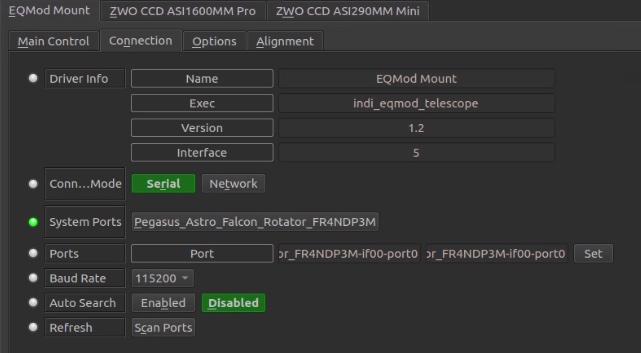
I’m experiencing the same issue. KStars on Ubuntu 20.04.3 with EQ6-R working for years. Haven’t had good WX since last summer. Tried to connect today both with 3.5.7 Stable and latest nightly. Ekos doesn’t recognize the mount. I see the device show up in dmesg, but the only device/port Ekos sees is the Pegasus Falcon rotator - which it cannot connect to with EQMOD. The only port listed in the “Ports” section of the EQMod Mount tab of the INDI Control Panel is the Pegasus Rotator port. That’s it. (See picture).
What happened to the EQMOD driver in the last few months?
Use 9,600 baud rate with an EQDir cable and 115,200 for a direct USB connection.
I’ve noticed glitches sometimes with other USB style connections so if you still have problems try with just the mount and put Scan Ports on. You might also need to reboot everything.
Did some more extensive troubleshooting. Tried complete wipe and reinstall of Ubuntu 20.04.3 to no avail. Discovered it’s the pl2303 serial-USB module in the latest 5.13.0-28-generic kernel. If I regress and boot to the previous 5.11.0-27-generic kernel, it works fine. Here’s the snippets from dmesg:
5.13.0-28-generic kernel:
[ 2.894277] usbcore: registered new interface driver usbserial_generic
[ 2.894292] usbserial: USB Serial support registered for generic
[ 2.907539] usbcore: registered new interface driver pl2303
[ 2.907574] usbserial: USB Serial support registered for pl2303
[ 2.907596] pl2303 1-6:1.0: pl2303 converter detected
[ 2.907602] pl2303 1-6:1.0: unknown device type, please report to [email protected]
5.11.0-27-generic kernel
[ 3.201216] usbcore: registered new interface driver pl2303
[ 3.201228] usbserial: USB Serial support registered for pl2303
[ 3.201243] pl2303 1-5:1.0: pl2303 converter detected
[ 3.201349] usb 1-5: pl2303 converter now attached to ttyUSB1
I tried sending the bug report to the listed email address, but it bounced. Don’t know how to fix the pl2303 module in 5.13. Anyone have any idea who to contact? Or how to build the 5.11 version of pl2303 into the 5.13 kernel?
Just for the record. I was using en EQmod cable (FT232 Serial (UART) ) plugged into the handset socket on the side of the mount as I was used to using
this with my HEQ5. This works at 9600 baud (the default speed set in indi control panel)
If you plug PC directly into the USB port on the side of the mount using printer/ USB2 A->B cable the device is a pl2303 but works at 115K baud.
You therefore need to set the speed in the dropdown box in INDI Contol Panel → EQMod Mount → Connection to 115200 baud.
Then it should work fine.
This may also be true of the newer HEQ5 which also has a built in serial port (I havn’t checked because I don’t have one).
You should avoid connecting the handset to PC using a serial cable as I believe this goes through 2 controllers and introduces pointing errors and latency.