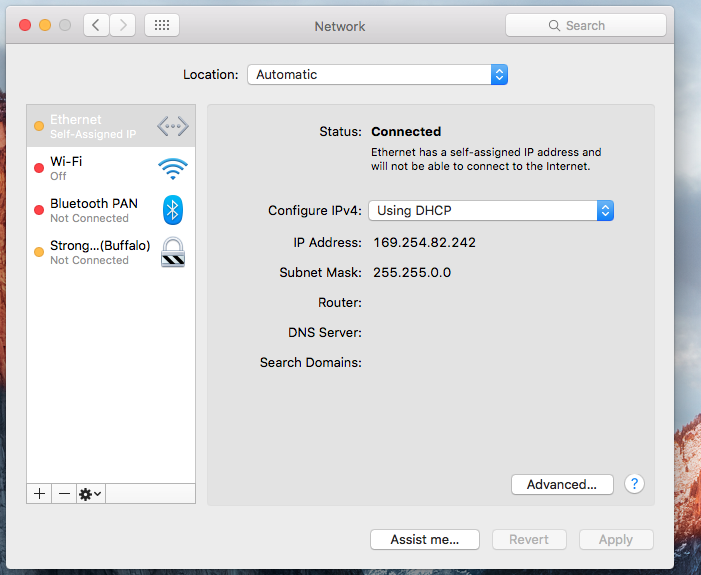
I followed your instructions.
PS: I did not need to attach the ethernet cable to anything.. just the act of inserting one end into the Stellarmate made the Wifi hotspot show back up, even with the other end unconnected to anything,
I then connected to the hotspot from the Stellarmate Ap, but the option to Forget the wifi never popped up. I tried three times, and at no time was I ever able to get that option to appear. I did, see other wifi routers in my building, but a they are not mine, I did not try to connect.
As soon as I turned my router back on, the Stellarmate hotspot again went away.
Ok, I just used another router and was able to follow your steps again. This time the Wifi button on Stellermate Ap did have the “Forget Wifi” option, so I selected it. I followed your instructions and it worked! I’m back in business.
What I am experiencing seems similar: when starting from scratch (i.e after reflashing the SD card), all fine, I connect to my wlan via the StellarMate app, I can thus connect to the internet via the StellarMate app (e.g. using the terminal or the browser). To be more precise, I am using the iPad and chose as wlan the StellarMate hotspot.
Then, if I connect the iPad to my router, and later on want to find the StellarMate hotspot, it is not there anymore. So I switch off the router and restart the Raspberry. So the StellarMate hotspot is available again, but as soon as I switch on the router, I lose contact to the StellarMate hotspot. That does not seem right.
Not sure if there is anything I need to do differently?
Mine was strange too in the fact that I could simply attach an Ethernet cable to the gadget - with nothing on the other end - and the hotspot showed up. I could have simply cut off the end of a cable and used it as a dongle
I have my Canon 6D attached to the StellarMate Gadget. My Macbook is connected to StellarMate using the Gadget’s hotspot - 4 meters away in direct view. All control of the Mount, Lodestar guider, and features of the 6D work well. However, the download time from the Gadget to my Macbook is excessive. A 40 MB FITS file takes 8 minutes. I tried restarting the Gadget and found that it does make a difference. In subsequent images, they took from 2 minutes to 4 minutes to download. Are these download times typical for a 40 MB file? Is there some setting in Stellarmate, Ekos, or the 6D that may be the reason for the delay?
Not sure. I’l try. On a side note - is it possible to connect ethernet from the Gadget to a Macbook without using a router? The Stellarmate instructions mention that I can connect via a router but says nothing about a direct connection.
If you are using a Mac then you need no router. Macs have had this ability since the 90s. You can just connect an Ethernet cable between the computers. I have done this for a long time and it is my emergency method for connecting to the pi if there is a network problem
I just tried connecting just ethernet direct from Stellarmate to the Macbook a few times, and Kstars crashed every time.
If this is not expected, I will try again and send log files.
Side note about wifi: if all routers in the neighborhood are using the same frequency band index, they share the same bandwidth. It may be worth switching the router to another band index to check.
I was not going through a router with Wifi. The Mac was connected via the Stellarmat’s gadget’s hotspot. Any way to change the band the Stellarmate uses?
Pk, your log file says you were trying to connect to localhost. When you connect to the StellarMate over WiFi from your Mac what is your profile setting for the host when connecting to the remote indi server? You can use the name or the ip address of the StellarMate computer. It’s something like stellarmate_363738.local
When I connect to Stellarmate on my Mac, with wifi, I simply turn on my Mac’s wifi and “Stellarmate” shows up.
I use 10.250.250.1 port 7624 in EKOS to connect remotely,
While the instructions mentioned “stellarmate_f0220c” I have never seen anything written after the name “stellarmate”.
I just now tried again to connect with Ethernet, and I still get the IP address of 169.254.82.242 on my end.
I tried using this in the EKOS INDO setup, as well as “10.250.250.1”, “stellarmate”, “localhost”, “stellarmate.local” all with no result.
Forgive my lack of computer networking knowledge. Are you able to connect a Mac to the Stellatmate with just a direct ethernet cable?
I notice that when I connect the Mac to the Stellarmate via wifi, I get a router connection of “10.250.250.1”.
If I connect via the ethernet, I receive no router IP address from Stellermate - as seen in post earlier.
Is there something with that?
Sorry, I was starting to write a reply to your last post, but I stopped it midway because I wanted to test them on my system. Yes, I connect this way often, but of course I have my own Raspberry Pi that I configured the way I wanted it and not a stellarmate.
Based on your post, your stellarmate is called stellarmate_f0220c and so when you connect to it from KStars it should be connected to the remote indi server called either stellarmate_f0220c or stellarmate_f0220c.local. I would try each to see which one works better.
The part I wanted to check on my system was the next bit. Your pi and your Mac should be able to connect just fine over Ethernet, mine are connected right now on my desk. But in order to do that, they need to be on the same network, just like if you were connected to the Pi’s adhoc network or the router with both the pi and the computer.
I would recommend testing the connection using ping before trying to connect to ekos to be sure you can communicate to the pi and you have the right name for the indiserver. It will be easier for testing purposes. To do this, go to the OS X terminal and type something like this and hit enter (note: my pi is called gemini, and also when you want it to stop trying, hit CTRL-c)
ping gemini.local
I get this as a response when it is right:
PING gemini.local (192.168.2.2): 56 data bytes
64 bytes from 192.168.2.2: icmp_seq=0 ttl=64 time=0.431 ms
64 bytes from 192.168.2.2: icmp_seq=1 ttl=64 time=0.445 ms
64 bytes from 192.168.2.2: icmp_seq=2 ttl=64 time=0.303 ms
I get this as a response when I have the wrong name:
ping: cannot resolve geminiwrong.local: Unknown host
I get this as a response when it is the right name but the network is not configured correctly or the cable comes unplugged:
ping: sendto: No route to host
Request timeout for icmp_seq 6