If I run KStars/Ekos on Mac, there is a menu bar with lots of great menus. When I run it on Linux (StellarMate) I don’t get any menus and only have the command buttons in the toolbar. I assume it must be possible to show the menus on Linux. What’s the trick?
So I noticed that if I run KStars under Linux Mint, it do have the menus in the KStars window. So maybe it is something about Debian (or StellarMate) that is not showing them. I believe Mint is Ubuntu.
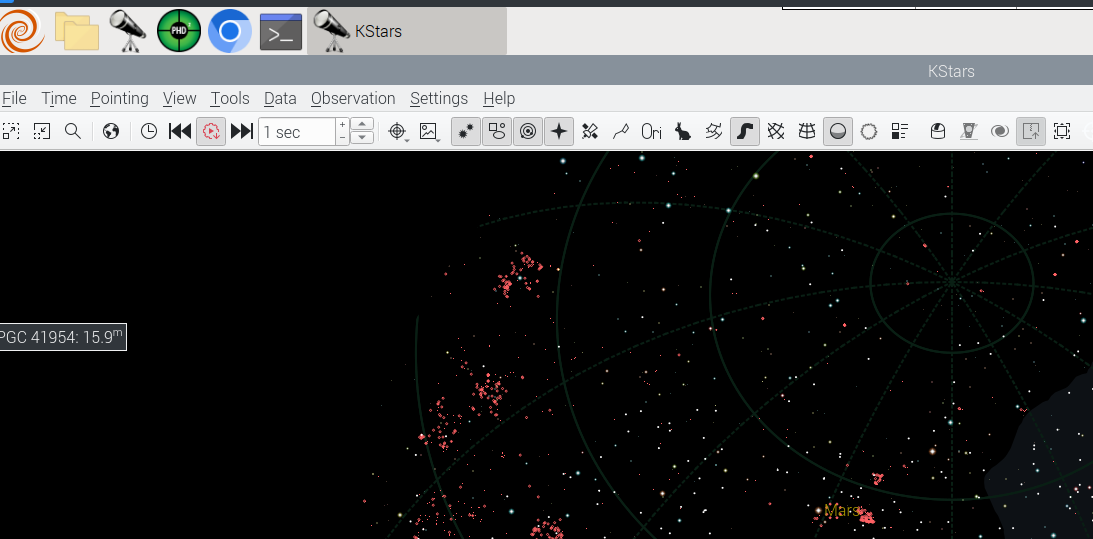
The whole menu bar, from File to Help is missing. It’s not that the menu bar is blank, it is just not shown at all.
ETA: Yes, this is on StellarMate.
I think I’ve solved the hidden menus problem. I was looking at the kstarsrc file and notice a line:
MenuBar=Disabled
After removing that and restarting, the menus have come back.
I believe what happened is that I copied the kstarsrc file from my Mac to StellarMate. Apparently on Mac the MenuBar is disabled, probably because the menus are shown in the menubar at the top of the screen. I hope there are not other properties in here that function differently between Mac and Linux. It would be nice to be able to copy them back and forth to maintain the same settings.
This bug seems to have a long history with KXmlGui! Currently I’m not able to work with Ubuntu and gnome (22.04, 24.4 and 24.10). The only remedy is to install Unity and LightDM. (Activating “Global Menu” perhaps works too, but I did not test that.)
EDIT: Problem solved (see below)
Additionally there is another quirk with KXmlGui compiled with QT6 on Ubuntu 24.10: The state of telescope and dome toolbars is not saved and always set to hidden upon leaving KStars.
EDIT: Problem solved (see below)
Problem solved!
KXmlGui seems to have a bug, where often the [MainWindow] part of the rc-file is copied to the head of this file.
Here is an example of “kstarsrc” (linux file path: “”~/.config/kstarsrc":
[codeDVI-D-0 Height 2560x1440=1184
DVI-D-0 Width 2560x1440=1924
DVI-D-0 XPosition 2560x1440=63
DVI-D-0 YPosition 2560x1440=52
Height 1200=784
Height 1440=1241
MenuBar=Disabled
State=AAAA/wAAAAD9AAAAAQAAAAEAAAGQAAAEIfwCAAAAAfsAAAAkAFcAaABhAHQAJwBzACAASQBuAHQAZQByAGUAcwB0AGkAbgBnAQAAACEAAAQhAAAAAAAAAAAAAAeEAAAEaQAAAAQAAAAEAAAACAAAAAj8AAAAAQAAAAIAAAAFAAAAGgBrAHMAdABhAHIAcwBUAG8AbwBsAEIAYQByAQAAAAD/////AAAAAAAAAAAAAAAWAHYAaQBlAHcAVABvAG8AbABCAGEAcgEAAAGpAAABygAAAAAAAAAAAAAAFgBJAE4ARABJAFQAbwBvAGwAQgBhAHIBAAADc/////8AAAAAAAAAAAAAACAAVABlAGwAZQBzAGMAbwBwAGUAVABvAG8AbABCAGEAcgEAAAQr/////wAAAAAAAAAAAAAAFgBEAG8AbQBlAFQAbwBvAGwAQgBhAHIBAAAFAf////8AAAAAAAAAAA==
Width 1600=1351
Width 2560=1749
[Align]
…
[Analyze]
…
[Capture]
.
.
.
[MainWindow]
DVI-D-0 Height 2560x1440=1174
DVI-D-0 Width 2560x1440=1776
DVI-D-0 XPosition 2560x1440=63
DVI-D-0 YPosition 2560x1440=52
Height 1200=784
Height 1440=1178
MenuBar=Disabled
RestorePositionForNextInstance=false
State=AAAA/wAAAAD9AAAAAQAAAAEAAAGQAAAEIfwCAAAAAfsAAAAkAFcAaABhAHQAJwBzACAASQBuAHQAZQByAGUAcwB0AGkAbgBnAQAAACEAAAQhAAAAAAAAAAAAAAbwAAAEXwAAAAQAAAAEAAAACAAAAAj8AAAAAQAAAAIAAAAFAAAAGgBrAHMAdABhAHIAcwBUAG8AbwBsAEIAYQByAQAAAAD/////AAAAAAAAAAAAAAAWAHYAaQBlAHcAVABvAG8AbABCAGEAcgEAAAGpAAABygAAAAAAAAAAAAAAFgBJAE4ARABJAFQAbwBvAGwAQgBhAHIBAAADc/////8AAAAAAAAAAAAAACAAVABlAGwAZQBzAGMAbwBwAGUAVABvAG8AbABCAGEAcgEAAAQr/////wAAAAAAAAAAAAAAFgBEAG8AbQBlAFQAbwBvAGwAQgBhAHIBAAAFAf////8AAAAAAAAAAA==
ToolBarsMovable=Disabled
Width 1600=1351
Width 2560=1687
Window-Maximized 720x1280=true
.
.
.
[View]
…
[Xplanet]
…
[indi]
…][/code]
The easiest solution is to erase manually the faulty copy so that only the regular entry of [MainWindow] is present. The line “MenuBar=Enabled” or “MenuBar=Disabled” can control the presence of the inner app menubar. Note that with a global menubar (like in Unity-desktop) this line has no effect!
Sorry for the bad formatting. Unfortunately I’m not able to correct my preceding post. I try again:
Problem solved!
KXmlGui seems to have a bug, where often the [MainWindow] part of the rc-file is copied to the head of this file.
Here is an example of “kstarsrc” (linux file path: “”~/.config/kstarsrc":
[code]DVI-D-0 Height 2560x1440=1184
DVI-D-0 Width 2560x1440=1924
DVI-D-0 XPosition 2560x1440=63
DVI-D-0 YPosition 2560x1440=52
Height 1200=784
Height 1440=1241
MenuBar=Disabled
State=AAAA/wAAAAD9AAAAAQAAAAEAAAGQAAAEIfwCAAAAAfsAAAAkAFcAaABhAHQAJwBzACAAS
Width 1600=1351
Width 2560=1749
[Align]
…
[Analyze]
…
[Capture]
.
.
.
[MainWindow]
DVI-D-0 Height 2560x1440=1174
DVI-D-0 Width 2560x1440=1776
DVI-D-0 XPosition 2560x1440=63
DVI-D-0 YPosition 2560x1440=52
Height 1200=784
Height 1440=1178
MenuBar=Disabled
RestorePositionForNextInstance=false
State=AAAA/wAAAAD9AAAAAQAAAAEAAAGQAAAEIfwCAAAAAfsAAAAkAFcAaABhAHQAJwBzACAA
ToolBarsMovable=Disabled
Width 1600=1351
Width 2560=1687
Window-Maximized 720x1280=true
.
.
.
[View]
…
[Xplanet]
…
[indi]
…[/code]
The easiest solution is to erase manually the faulty copy so that only the regular entry of [MainWindow] is present. The line “MenuBar=Enabled” or “MenuBar=Disabled” can control the presence of the inner app menubar. Note that with a global menubar (like in Unity-desktop) this line has no effect!
Same for me, Telescope toolbar not remain visible, any time I start have to add.
Your change not have effect in my case.
Debian 13 Cinnamon.
In a subsequent test, using kstarsrc from a Mint installation on another partition, the telescope toolbar is visible upon initial startup. When the program is closed, kstars writes to kstarsrc, and upon the next restart, Telescope toolbar it is no longer visible.
Compile with QT6.
Edited:
State=AAAA/wAAAAD9AAAAAAAAB4AAAAO/AAAABAAAAAQA…
If this value is in [mainwindow] part of file kstarsrc, telescope toolbar is visible
When closed Kstars write it in first line and it is no more visible.
Hi Teseo
I can confirm! In a QT6-environment (*) the telescope and the dome toolbar do not survive a restart. I don’t (yet) know why. I will investigate.
(*) With QT5 all works.
Seems the new version 6.3x.x of KXmlGui has a new bug!
The new version 6.3x.x doesn’t store the window state in ‘~/.config/kstarsrc’ anymore. The state is saved in a new file ‘~/.local/state/kstarsstaterc’. If you have a look at this file, you’ll find the well known state string. Unf[size=100]ortunately this string is not written or read in correctly and the state of the telescope and dome toolbar is not reproduced. Hence they do not appear after a restart of kstars.
There is a workaround though: You can remove the item ‘hidden=“true”’ in the toolbar tag of the “TelescopeToolBar” and the "“DomeToolBar” in the the file ‘~/.local/share/kxmlgui5/kstars/kstarsui.rc’. This file is also read in at the start of kstars and holds a kind of a base configuration. ( I don’t know why it’s still ‘kxmlgui5’ instead of ‘kxmlgui6’.)[/size]
(EDIT: All file names and locations on LINUX!)
2 Likes
Newest finding is, that KXmlGui 6.3.x.x works correctly here on Wayland!
With the new KDE-Plasmadesktop 6.8 in EndeavourOS I had to switch to Wayland and voilà … toolbars are restored as they should. So it seems to be an issue of X11?